As someone who attended the Australian School Library Association (ASLA) conference and connected with us there, you understand the learning potential of 3D technology.
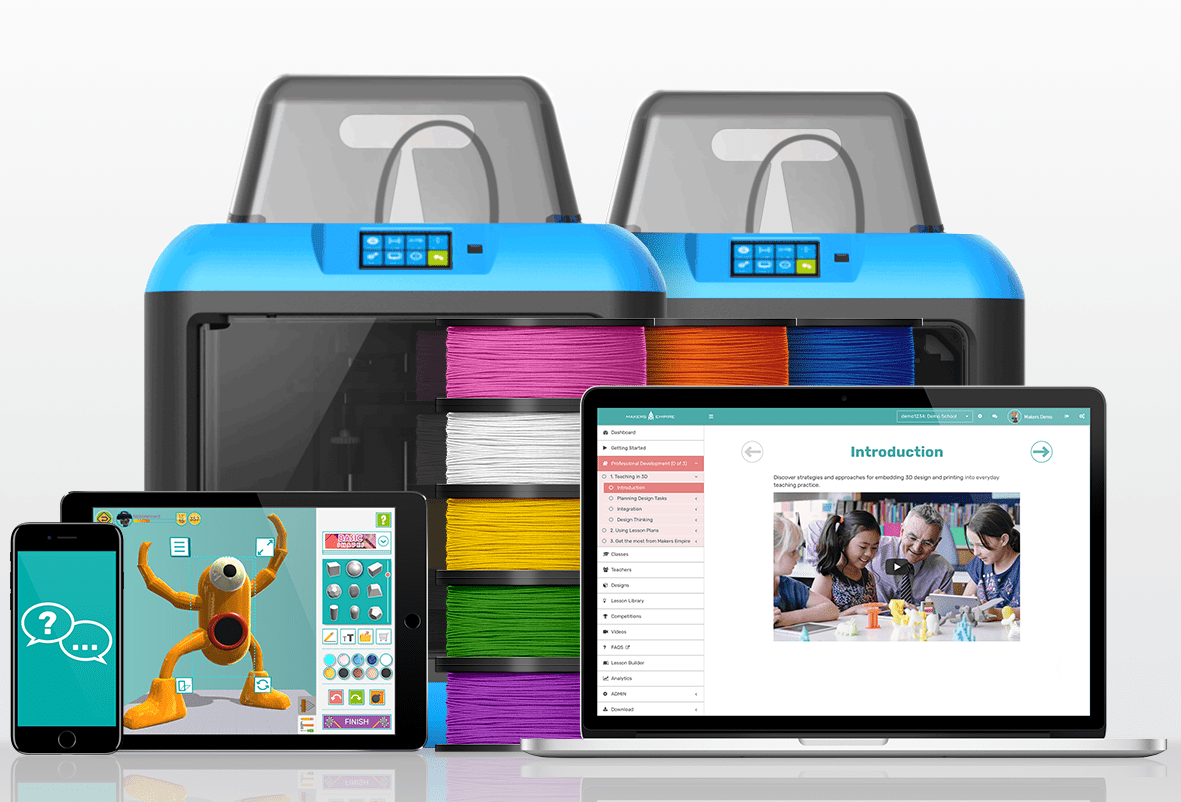
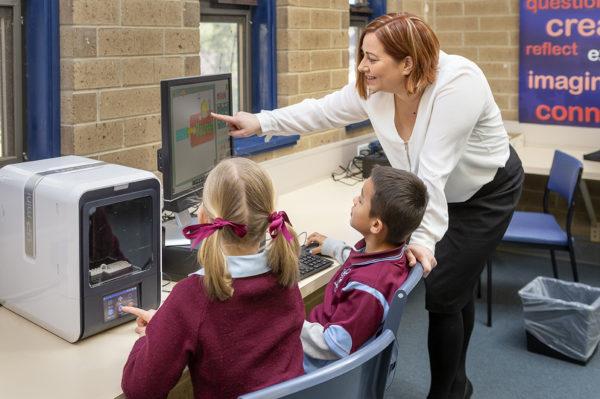
Makers Empire helps schools maximise the learning potential of 3D technology, cover Design & Technologies curriculum, and teach Design Thinking, STEM concepts and 21st-century learning skills. Teachers are supported by comprehensive resources, easy to use software and class management tools, professional development, and ongoing support provided by Makers Empire’s customer service team.
Common Sense Education ranked Makers Empire second out of 180 EdTech products reviewed for their Best EdTech of 2018 List.
SPECIAL OFFER FOR ASLA conference ATTENDEES
[su_note note_color=”#f27b7d” text_color=”#ffffff” radius=”0″]As a thank you for connecting with us at the ASLA conference, receive 20% off the usual price when you purchase a Makers Empire’s School Subscription or Makers Empire 3D Printer Package. Use this special discount code — ASLA2019 — when requesting a quotation for Makers Empire to qualify. This offer won’t last so don’t delay – sign up today![/su_note]
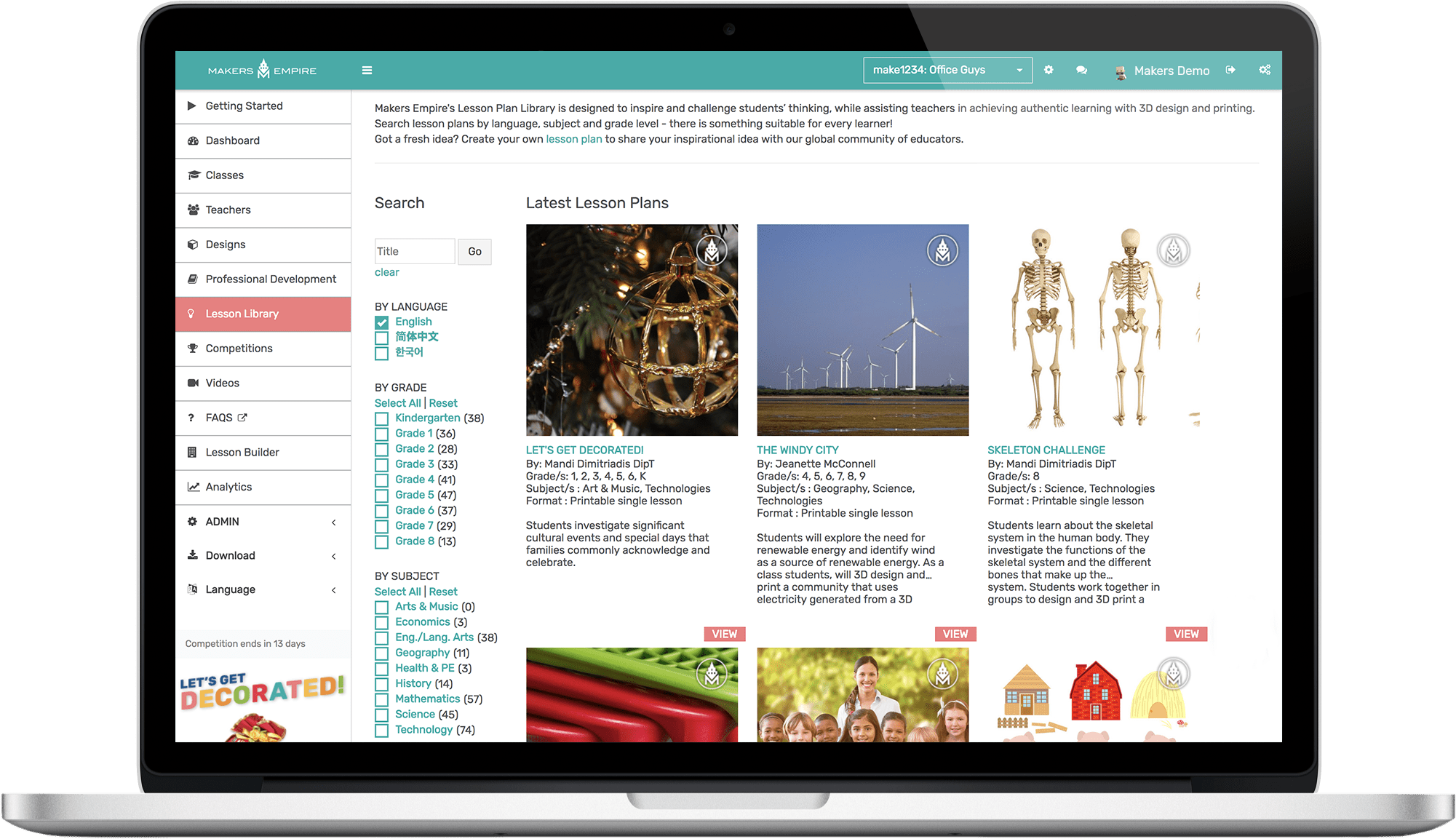
130+ lesson plans aligned to the Australian Curriculum, American Common Core standards, ISTE standards for educators and Next Generation Science standards
“By teaching Makers Empire through the library I am able to implement its use across the entire school and support all teachers using it. Some teachers are happy for me to simply show them how to use it and help set up usernames and passwords and then they use it independently with their own students. Others would like to work with me to lead its implementation in their classroom.”
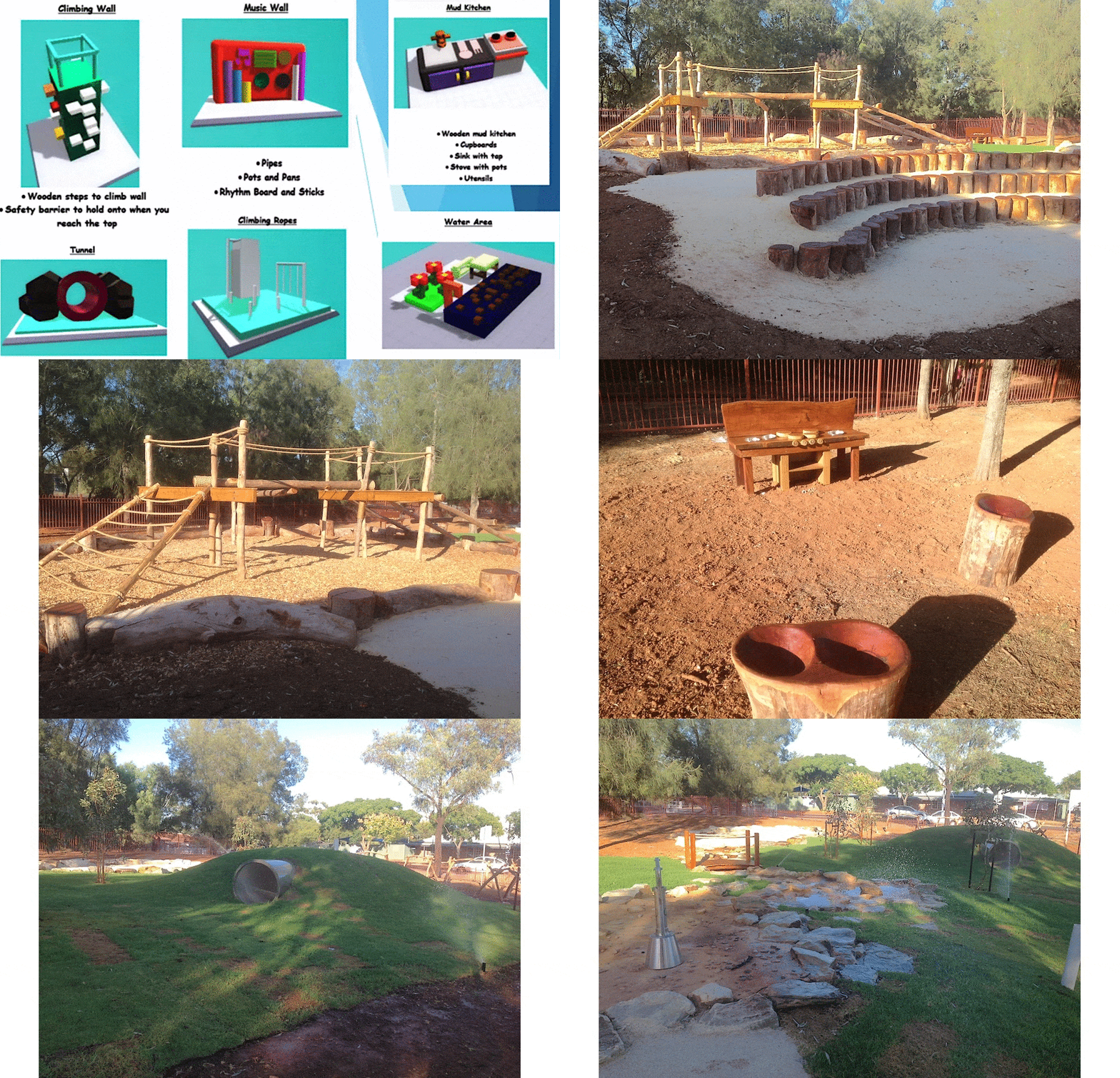
“The success and accomplishment that was felt by solving a real-world problem with our ‘Nature Play’ project was incredible.The students that were involved feel a strong connection to the space and are proud of how their small idea and hopes turned into something real that could be enjoyed by the whole school and members of the community.”
When explaining the Design Thinking cycle to students it often helps to have an example that you can use to demonstrate the five stages. So here are five videos made by schools showing how their students use the Design Thinking cycle and Makers Empire to identify and solve real-world problems, needs and opportunities.
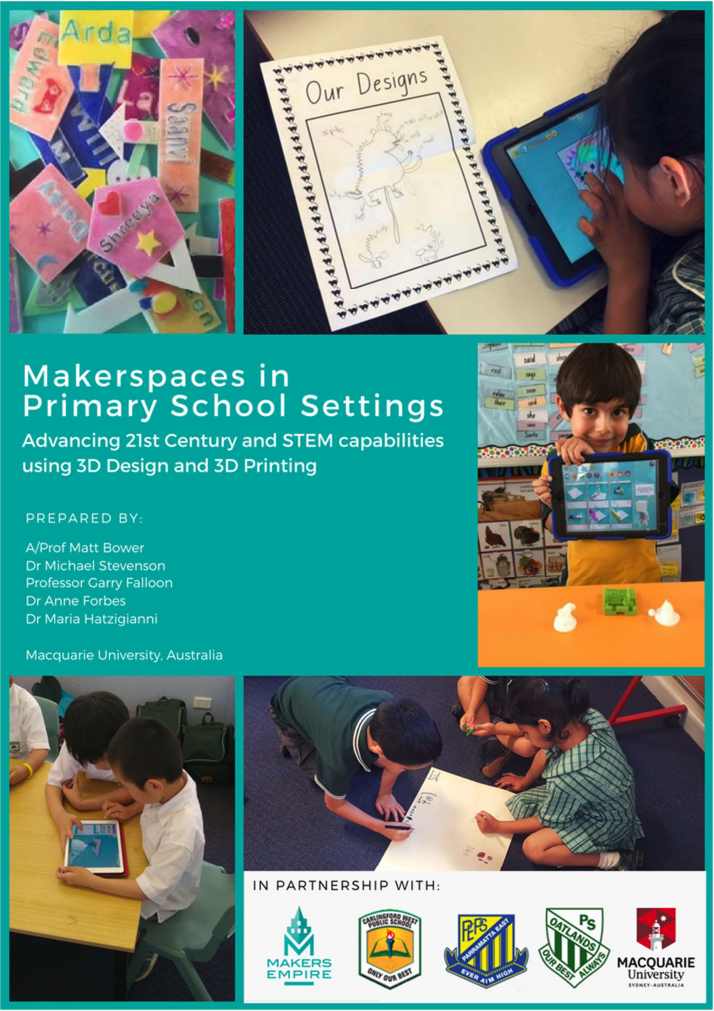
The research study examined how maker activities using 3D design and 3D printing technology could enhance learning and teaching outcomes.
The recently published research study report reveals the compelling benefits of this type of learning for primary educators and showed that makerspaces can be highly effective at developing children’s creativity, critical thinking, design thinking and digital skills.
Students were highly engaged with the 3D technology, and the idea of solving genuine design challenges – it helped boost their confidence and resilience when dealing with setbacks, particularly for those less capable students.
Teachers became more comfortable with technology, and more collaborative and flexible in their teaching.
All of the 24 classroom teachers who participated in the focus group expressed a desire to integrate 3D design-based makerspaces into their future classes.
“The teacher resources were comprehensive and supported the easy implementation of the lesson. The Makers Empire 3D design app made sophisticated designing available and accessible to young students. They were totally engaged as they designed their very own 3D Hungry Caterpillar.”
Rene Wavell, Assistant Principal
North Adelaide Primary School, North Adelaide, SA
“At Scotch College Adelaide, 3D printing has been integrated into the Year 6 curriculum during the past 12 months. The pupils really enjoy utilising 3D printing technology in the classroom and the session provided by Makers Empire allowed the students to showcase their knowledge and creativity. This was yet another opportunity for our students to extend their learning.”
Stuart Sluggett, Upper Primary Curriculum Coordinator
Scotch College, SA
“I’ve been astounded at how much the students using (Makers Empire) have developed over the last 18 months. The kinds of design they’re doing now are very sophisticated. I give them a design brief and the extent to which they take it always surprises me. Using (Makers Empire) has really accelerated their learning.”
Kate Tyrwhitt, R-7 Visual Arts & Student Services
St Michael's School, SA
“It was an absolute delight to have you work with my Foundation (5 year old) students. They’re still talking about the experience! … What you presented to the children was fantastic! Thank you for presenting an age appropriate and engaging lesson. The lesson was scaffolded to suit the needs of Foundation students and the students felt so proud to have independently designed their own dinosaur and key ring.”
Sophia K, Teacher
Fulham North Primary School, Fulham North, SA
“The Year 7 class at Westminster Preparatory School had a fantastic time… Students had the opportunity to design and create their own 3D object. This was a great way for them to learn about the design process from both concept to production. We believe this technology has a place in student learning and fits in nicely with the Australian Curriculum and many levels of primary education.”
Jon Dyer, Preparatory ICT Teacher
Westminster School, Marion, SA
“As a school we need to ensure we provide as many broad opportunities as possible to promote and prepare our students to be life-long learners. Many of the jobs that exist today will be obsolete by the time our children enter the workforce. As a school we are excited by the creative and innovative opportunities the relationship with Makers Empire will bring through 3D design and printing.”
Ilia Tsoutouras, Principal
Virginia Primary School, Virginia, SA
“…we looked extensively for a software program that was inclusive of all learning styles. The 3D design & printing app is brilliant in the way it allows students to start at a level that’s suited to previous learning and nurtures their journey forward. The developed lesson plans can be delivered explicitly to the class or used as individual tutorials and we feel confident in the notion that we are addressing the ACARA performance standards.”
Bill Kelton, Teacher
Victor Harbour High School, Victor Harbour, SA
“A roadmap to start 3D printing at our school.”
Giovanna Iannicelli, Teacher
St Mary's College, SA
“The Makers Empire team came to run a session on 3D printing at our STEM day. It was the most popular session of the day and the students clearly had a fantastic time designing in 3D.”
Nicholas Smith, Deputy Head of Junior School
St John's Grammar, SA
“Makers Empire is friendly towards all ability groups and help engage students who are less motivated to be working in the classroom. It gives students the opportunity to be creative and learn by trial and error in a digital format. On paper some students get disheartened when drawing designs and have to erase mistakes and makes their work look messy. Using this program it is simple to remove mistakes. I think this has been a fantastic tool to have in the classroom. I have many teacher friends and have actually shown them the program and they are all very impressed.”
Aaron Vigor, Teacher
Yankalilla Area School, Yankalilla, SA
“This was the best PD that I have been involved in for ages… This whole project has been inspiring for teachers and students in empowering students to become change makers. Our students were so engaged and excited about solving a real world problem… The fact that they could see they could help someone through their own design, meant their learning was authentic and valued.”
Bianca Laister, Deputy Principal
Birdwood Primary School, Birdwood, SA
“I think the lesson plans are fantastic for teachers – especially those who may find the hardest part being the inspiration/ideas on where to start…The Makers Empire app is a MASSIVE value add to the learning. We could have taught children how to design an iPad stand, learn what makes a structure strong, what are strong ‘shapes’, how to keep an item balanced etc etc etc – but the ability to create their design in 3D AND then print it makes the learning so much more obtainable and relevant/real.”
Chris Bennie, Assistant Principal
Stirling East Primary School, Stirling East, SA
“Students developed a range of design skills..They learnt what the design process looked like, learnt how to create their designs in Shaper, learnt about scale when printing their designs. Students learnt to measure their objects as well as problem solved to make their design as similar on Makers Empire as their initial design… the students were so engaged and thoroughly enjoyed the learning experience…(Makers Empire) is a wonderful program that engages all students well!”
Abbie Krieg, Year 3/4 Teacher
Snowtown Primary School, Snowtown, SA
“I think it is great because it integrates so many curriculum areas that we have to do in a busy classroom. You have got your maths, science, you can do literacy, then you have also got your digital technology and design technology, and art as well… We are in an ever-changing world and we all have to keep up.”
Shauna Wood, Year 1-3 Teacher
Carlton School, Port Augusta, SA
“…wonderful day. I heard a few teachers talking about this being the best professional learning day they have done in their careers! Great job, we are planning to share with the Governing Council and run a parent information night to follow this up.”
Grant Small, Principal
Grange Primary School, Grange, SA
‘I found Makers Empire to be incredibly user-friendly. In particular, it was very “school” friendly. There are very easy processes for children of all ages and literacy levels to log onto their accounts saving so much time and stress… the learning is in the process, not the product. You could very successfully use Makers Empire without ever actually printing anything (but it is a lot more fun and exciting when you can print it!)… All unit plans have direct links to the curriculum including the Digital Technologies curriculum. The deeper I delve into using Makers Empire the more opportunities I see for using maths in an authentic manner, particularly when using the Shaper app with measurements, shapes etc.”
Hajnalka Molloy,Leader of Campus Library and Information Services
Aberfoyle Park Primary Campus, Aberfoyle Park, SA
“I have seen numerous benefits from our ‘Nature Play’ project and other 3D printing learning we have undertaken at Blakeview Primary School. During our 3D design lessons on the iPads using Makers Empire, the most significant benefit I have noticed has been the increase in student engagement. I have witnessed an increase in teamwork and positive interactions between students, which involved the sharing of learning and discoveries between groups. Students were able to work together to collaborate on projects and use each other’s varying strengths. They offered guidance and gave each other constructive feedback on what they liked about other designs and gave helpful suggestions for improvement, which promoted the persistence required to perfect their designs. Students also developed their spatial awareness through the ability to transfer and manipulate their 2D design plans and reproduce them into 3D design models… The success and accomplishment that was felt by solving a real-world problem with our ‘Nature Play’ project was incredible. The students that were involved feel a strong connection to the space and are proud of how their small idea and hopes turned into something real that could be enjoyed by the whole school and members of the community.”
Megan Koop, Classroom Teacher
Blakeview Primary School, Blakeview, SA
“The kids just fly…The software makes it easy – if the software was more difficult it wouldn’t work as well. It’s at the right level for the reception students but it’s also not too easy for the upper primary kids. It’s a good start-off point… My class will go into another class — junior primary, middle primary or upper primary — and will partner one on one with the other students and help them learn how to use the software… My kids love helping the other students… Just to see the students faces light up during lessons is so good.”
Monica Berno, Grade 6/7 Teacher
Fulham North Primary School, Fulham North, SA
“We’ve been using Makers Empire throughout the college and in Technology lessons for a while now, but this was the first time we used it in our classroom with our year 7s. The students thoroughly enjoyed the game-like structure of the program and were keen to work through levels to unlock parts for their designs… when we found the Global Design Program that Makers Empire ran, we were incredibly keen to connect with other schools… The learning that occurred from this project was invaluable and more than just curriculum based. Whilst the students learned about livability from researching and designing parts of a city that adhere to Mercers Quality of Living Factors, they learned about what living and cities are like in China from first-person conversations and experiences – a far deeper intercultural understanding than what they could possibly gain from textbooks and the internet.”
Jolanta Stephens, Grade 7 Teacher
Immanuel College, Novar Gardens, SA
“I have to commend the recent update to Makers Empire. The precision mode is a great addition, particularly for our older students, who have been loving it already. It’s really nice to use a product that is built around kids and teachers and can evolve with their needs. Thank you for consistently taking and considering our feedback and improving your already great product. I had a class of Receptions and Year ones today. The Year ones were working in ME and the Receptions were chomping at the bit to get in too! We have been loving using the Toy Designer with our younger students, as the access level is just right for them to create unique 3D models from their own imagination, but scaffolded enough for them to easily learn the tools in a lesson. I’m very glad we are using Makers Empire.”
Liam McComb, Teacher & Digital Communications Coordinator
Goodwood Primary School, SA
“I liked the way the site is geared toward easy use by teachers and the tutorials help the learner (teacher or student) to be independent and self-driven. The app was easy to download and create accounts in. The multiple entry points available in tasks also differentiates well for teacher. The program engages students with its game-like appearance and improves not only their creativity but critical thinking and collaboration skills. I like the option of having the designs printed off-campus due to time constraints but it is also valuable for students to see the printing process from start to finish. This is an excellent way to create and give back to the community in our Christmas Lights Program. More schools should try it!”
Deb Cope, Year 7 Teacher
Westminster School, SA
“I don’t think there was one child in the group that didn’t achieve something with it… Also, there was never a problem with them going back and doing something again. If this was a writing project and I asked them, ‘can you go back and redo this?’, the kids would groan. But, if we said, ‘I really like the way you did this but can you go back and try this?’, they would,”
Joann Packer, Deputy Principal
Mundulla Primary School, SA
“These are crazy times we’re now living in and our staff are feeling quite stressed and inundated about the current situation. The free resources you have provided will help to lighten the workload.”
Bianca Laister, Deputy Principal
Birdwood Primary School, SA
“Makers Empire… (has) developed a range of learning resources for parents and teachers that you can use for free. Students and families can also download the Makers Empire app for free at home if your school doesn’t already have a subscription. Using the app encourages problem-solving, critical thinking, design-based thinking and develops spatial reasoning in children. It’s ideal for primary school-aged children. (I have used it with Reception to year 7). YOU DO NOT NEED A 3D PRINTER… It’s more about the thinking and design process – and having fun.”
Hajnalka Molloy, Teacher Librarian
Aberfoyle Park Campus, SA
“It has been great to have this subscription to deliver STEAM sessions virtually – without it I would not have been able to run my sessions at all. Thanks for sharing this resource.”
Michelle Dawson, Digital Learning Coordinator
Adelaide Hills Council Library, SA
“Most students had minimal prior knowledge to 3D printing (so) all classes started with the ‘Introduction to 3D printing’ (found on the Makers Empire website). I then looked through the lesson library and found the Chocolate Moulds unit of work, which focuses on students learning about measuring volumes and capacity by designing and printing a chocolate mould. I slightly tweaked it as it needed to engage and cater to students from Reception to year 7, and I also wanted to build more empathy with students. So we decided to make chocolate moulds as a Christmas present for a family member. I really enjoyed seeing the variations of designs from students in reception to year 7.”
Shauna Wood, Classroom Teacher
Madison Park Primary School, SA
“This was the first school I had worked in which had an easy to use 3D printer set up with a designated computer attached to it. It was easy to log in to Makers Empire as a teacher and print the student’s designs directly rather than having to save files to USB’s or send from a classroom and run across to the printer etc. It’s great that 3D printers are becoming more affordable. All our colleagues and classes incorporate 3D printing into at least 1 of their Inquiry or digital tech studies so that the whole school are utilising the 3D printers rather than them collecting dust.”
Jane Glasson, Teacher
Cleve Area School, South Australia
“A simple 3D modelling program for the early years that is easy for students to use on the IPads.”
Alex Lumb
Prospect Primary School, South Australia
“Makers Empire is an interactive, ‘kid-friendly’, easy to use and intuitive CAD Package.”
Jim Goodall, Senior Leader for School Improvement for the Mt Lofty and Heysen Dept. for Education Partnerships
South Australia
“Very easy to navigate and use. User friendly.”
Kathy Sandercock, Teacher
Roseworthy Primary School, South Australia
“The product itself combined with the resources and management environment makes it an all in one solution irrespective of your experience or resources.”
Chris Bennie, Assistant Principal
Stirling East Primary School, South Australia
“Makers Empire is an age-appropriate platform for designing and 3D printing.”
Jess Moroney, Principal
Woodside Primary School, South Australia
“The ability to integrate Makers Empire into many curriculum areas is a huge benefit.”
Teresa Shepherdson, Teacher
Walkerville Primary School, South Australia
“I would like to let you know that I am loving my experience with the app at many levels: students experience, teaching and assessing. This term I work with 10 classes so around 270 students. It was very easy to create classes and it is easy to track my students work.”
Lucy Jachacy, Science Teacher
Highgate Primary School, South Australia
“Having a blast with it, thanks! (Makers Empire) is all the rage at school at the moment.”
Jordan Wayne, Technologies & 4/5 Teacher
Reynella South School, South Australia
“I honestly haven’t had this big a reaction from our team for any other type of technology I’ve introduced to the school. Getting teachers to step out of their comfort zones and try new tech has been a major struggle in my STEM role… The Makers Empire interest and conversations amongst staff and students have been spreading from there. The classes who got up and running early even had the benefit of being able to assign home learning tasks during the lockdown. One of the classes I helped set up today is our special needs class. I’m often told, “Our kids can’t do that,” so I can’t wait to hear the feedback from that group in particular. I cannot thank you enough for helping me move the needle with Makers Empire and STEM in general. I’m hopeful that it will help me to continue to gain interest from colleagues with other types of new learning technologies.”
Zach, STEM Teacher
Berri Primary School, South Australia
“Learning the ins and outs of new technologies can be a daunting task that many teachers simply do not have time for. Thankfully, teachers don’t need to be experts to get the ball rolling with Makers Empire. A key strength is that so much learning is built right into the platform. Students progress through tutorials at their own pace, with written and spoken instructions there to guide them. My students think they’re just playing a computer game when they use Makers Empire, but from a teacher’s perspective, I see them developing vital spatial skills, persistence and confidence while experiencing how technology can enable them to become problem solvers of the future. Makers Empire has resulted in one of the smoothest introductions of new technologies at our school. It is accessible for a range of ages and abilities, it is a versatile tool that can be applied for many purposes and the Makers Empire team has been there to support us through whatever hurdle we’ve encountered along our journey.”
Zack Plaquet, Teacher
Berri Primary School, SA
“My year 4 students are doing the Sustainable Communities challenge and loving it. My year 2s are doing the Water Challenge and loving it! Just wanted to pass on thanks from the team and I for your fabulous resources!”
Jo Rea
Teacher, Scotch College, SA
“The Makers Empire – Andy Thomas Foundation Kids in Space Project was a comprehensive learning experience for both staff and students. Firstly building teachers’ knowledge with quality PD on space and Makers Empire enabled teachers to confidently teach the students. The students were highly engaged in the learning, empowered to problem solve and be creative to solve space issues whilst developing their skills on Makers Empire. The showcase event with other schools around the state was a highlight. I would highly recommend this project for schools to participate in.”
Rory Hunt, Principal
Ungarra Primary School, SA
“Makers Empire provides so much more than a great app but resources and connections to curriculum, industry and innovation in our society.”
Kate Tyrwhitt, Teacher
St Michael’s College, SA
“The Kids in Space Makers Empire Project allowed our children to collaborate whilst working in teams. It encouraged them to test, problem solve, and retest and as a result built children’s resilience.”
Julie Roether, Teacher
Ngutu College, SA
“Participation in the project is a learning experience not to be missed. Your students will learn from you and you will learn from them. Collaboration, communication, creativity and problem-solving skills will be enhanced as you progress through the design thinking process with space in mind.”
Michael Cannavan, Teacher
Cowandilla Primary School. SA
“I have been delighted with the ongoing support that Luke and the Makers Empire team has provided to me and my site. Luke has been very responsive to my questions and queries and was successfully able to repair our printer. He kept me fully informed about the printer and the time line required to fix it… A wonderful engaging program, fantastic training, and outstanding ongoing support makes Makers Empire so successful!”
Jane Wetherall, Year 1/2 Teacher
Clare Primary School, SA
“The managed projects are good. The students have enjoyed being involved, loved being able to work independently and have gained a lot of knowledge. The have also created some great designs.”
Ailsa, Teacher
Hawker Area School
“I nearly pulled out of the project because a student in my class had recently lost his home in a house fire. After speaking with his parents, I decided to go ahead and I’m so glad that I did. The Challenge Course and the videos were so sensitively and carefully put together that the student felt safe and comfortable with sharing his own experiences. I think being able to be creative and think of ways to help has been empowering for this student in particular as well as the other students in my class. This student now wants to be a firefighter!”
Teacher participating in Bushfire Brave program
South Australian School
“Thank you all at Maker’s Empire for your support of our learning programs in STEM over the last seven years that we have been involved with Makers Empire. The opportunities that 3D printing brings are amazing and the confidence and inquisitiveness that it builds is awesome. You have a fabulous team, including your amazing techs. I have sought help numerous times from your tech team and they are without fault. I will continue to tell other teachers of the amazing product and team that Makers Empire is. Keep doing what you are doing, it is so important!”
Stephanie Rudiger, Teacher
Loxton North Primary
“This is an exciting initiative which we foresee will enrich the learning experience of Scots boys. The usefulness of the 3D equipment to the students is evident as their visualisations become reality.”
John Crerar, Head of the Preparatory School
The Scots College, NSW
“We are currently using Makers Empire with the whole of year 5 at the moment and have brought a second 3D printer to keep up!! The Learning Support Platform and its new design looks awesome, the functionality, navigation and amount of information available is excellent. Thanks!”
Stephanie Comino, Preparatory Science Facilitator
The Scots College, NSW
“Students have been learning about creating stories and developing characters. The students designed a character on their iPads, which were then printed using the latest 3D printing technology. Together with their buddies from Scotch (College), the students videoed their stories using their 3D characters and backdrops as settings. The narratives that took place between the students as they created their stories were very entertaining.”
Heather Pope, Head of Junior School
Presbyterian Ladies College, VIC
“We are certainly excited to begin investigating the possibilities this will open up to our students in multiple areas of the curriculum. The Makers Empire app makes it easy for our students to begin designing and appraising their creations and then gives them immediate feedback with the end result being their very own 3D model.”
Clay McCann, Deputy Principal
Labrador State School, Labrador, QLD
“…our staff were genuinely impressed… The Makers Empire 3D printing iPad app exceeded our expectations. The design and creative elements of this software have been carefully designed to engage children while opening up numerous educational opportunities and learning experiences. We loved the Teacher (Dashboard) with its support, ideas and integration of the Australian Curriculum. A great way to expose our students to this rapidly emerging technology that will have a significant impact on their lives.”
Stephen Corcoran, Director of Digital Learning
St Stephen’s School, WA
“Exploring 3D objects using the @MakersEmpire software. The students of 2/1N didn’t want to stop and kept asking when can we do it again!”
Samantha Newth, Assistant Principal
North Kellyville Primary School, Kellyville, NSW
“The (3D printing) lesson plans are really good. While they’re designed around the Makers Empire software, they’re actually designed around the design cycle. This is important is that it’s actually saying to kids, here’s a design cycle that has these steps in it: you have a thought, you make a plan, you design it, you print it, you check it, and then you go back and you improve it. It’s driving kids to think about the design cycle.”
Russell Deer, Principal
Braemar College, Woodend, VIC
“Redlands has been using Makers Empire to support the students’ creative writing efforts. Students were asked to design a character or an object using the Makers Empire software. After this creative process, students had to justify the design attributes of their character or object in writing. Students became actively involved in the creative process which helped inform their writing process. Makers Empire is a great hook before a writing task.”
Shireen Winrow, E-learning Facilitator
Redlands School, Redlands, NSW
“Before I started with Makers Empire I had no idea how 3D printing worked. I avoided coding and anything to do with the DigiSpace… Definitely, do the PD (professional development) from Makers Empire. It was very clear and helped me put 3D printing into practice… I think it’s wonderful for someone who is a bit fearful… it really helped me develop confidence in it.”
Jane Doherty, Teacher Librarian
Kelvin Grove State College, Australia
“The kids love it and it is a pleasure to teach with. It is easy to use and all the extra activities do a great job at developing the skills necessary to design printable 3d models in a fun, game-like manner. My students continue their learning at home completing challenges and developing new skills. This is the true value of software. It can provide a platform for students who are enthusiastic to keep learning after the school bell rings… The addition of the Australian Curriculum aligned challenges is fantastic and really encourages the use of this software in state schools throughout Australia… Giving feedback to students and rewarding great work is very easy using the assessment tools. I use this feature a lot.”
Jay Wright, SET, STLAN and Technologies Teacher
Vale View State School, QLD
I just had a play and I LOVE the changes you’ve made. It will make life much easier and more obvious and visible for the kids (and me too!).”
Johanna Emptage, ICT teacher
Courtenay Gardens Primary School, VIC
“What I really liked about Makers Empire was that it provided a comprehensive package, and one that can make sense to students from five to fifteen years of age… The real beauty of Makers Empire doesn’t lie in the printers or the software. In my opinion, where the company really shines – and the reason I was so eager to go through it – is in the wealth of curriculum-based lessons it provides, along with a host of lesson plans and a thriving community that contributes to the lesson bank. On top of this, the Makers Empire subscription allows teachers to set up classes and assess designs as they come in. Students have their own accounts (in our case, linked to their Google for Education accounts that we already set up), which are linked to their teacher’s. It is my intention for all students in our school (from Foundation to Year 6) to get the opportunity to use Makers Empire 3D. There are plenty of lessons for all year levels in the library to choose from, as well as ones provided by the community… Makers Empire 3D is not cheap. However, a lot of time and effort has gone into its creation, and I believe the price is well worth it. Not only is it a student-friendly piece of software, but it also contains a wealth of teaching and assessing tools for educators.”
Joel Aarons, Media Arts and STEM Specialist Teacher
Camberwell South Primary School, VIC
“Thank you for your latest wonderful and thoughtful Social Distancing Challenges. I think they are just awesome!! I will most definitely be using them with my students when setting up online lessons at home.”
ICT Teacher
“Thank you for all the work you have put into the home learning space. We have a ‘student free’ week starting Monday (with the students of working parents in attendance). This will be a great opportunity to share with staff the online PD.”
Jonny Wright, Year 4 Teacher & STEAM Coordinator
Nambour State College, QLD
“I am loving Makers Empire. It has been great and students have been able to do their remote learning with ease.”
Emma Pukallus, Teacher
Haden State School, QLD
“While it has been madness with the online/face-to-face teaching dramas, I wanted to give feedback on the COVID-19 at home learning tasks – they have been absolutely brilliant. I set a term of tasks, once a week scheduled on Seesaw for St Pats, Yr 2-6. Now that we are back at school I thought I would still use them this term. They have been a massive hit and that actually surprised me. The students DON’T like the massive pre-planning, ideating, etc etc, but just getting down and dirty on a direct task. Some have produced fantastic designs… I am writing to let you know how MASSIVELY successful this approach has been. Short, sharp, 40 min direct task. If you ever want to release some more tasks like this, please do. We are working through the list, once a week, in a 40 min session.”
Jane Edwards, STEM Teacher
St Patrick's and St Thomas School, SA
“We fully support you guys doing what you can to support everyone who is connected to your company. In my opinion, you are doing a lot of good and pumping out some really great material and programs.”
Jay Wright, SET STLAN & Technologies Teacher
Vale View State School, QLD
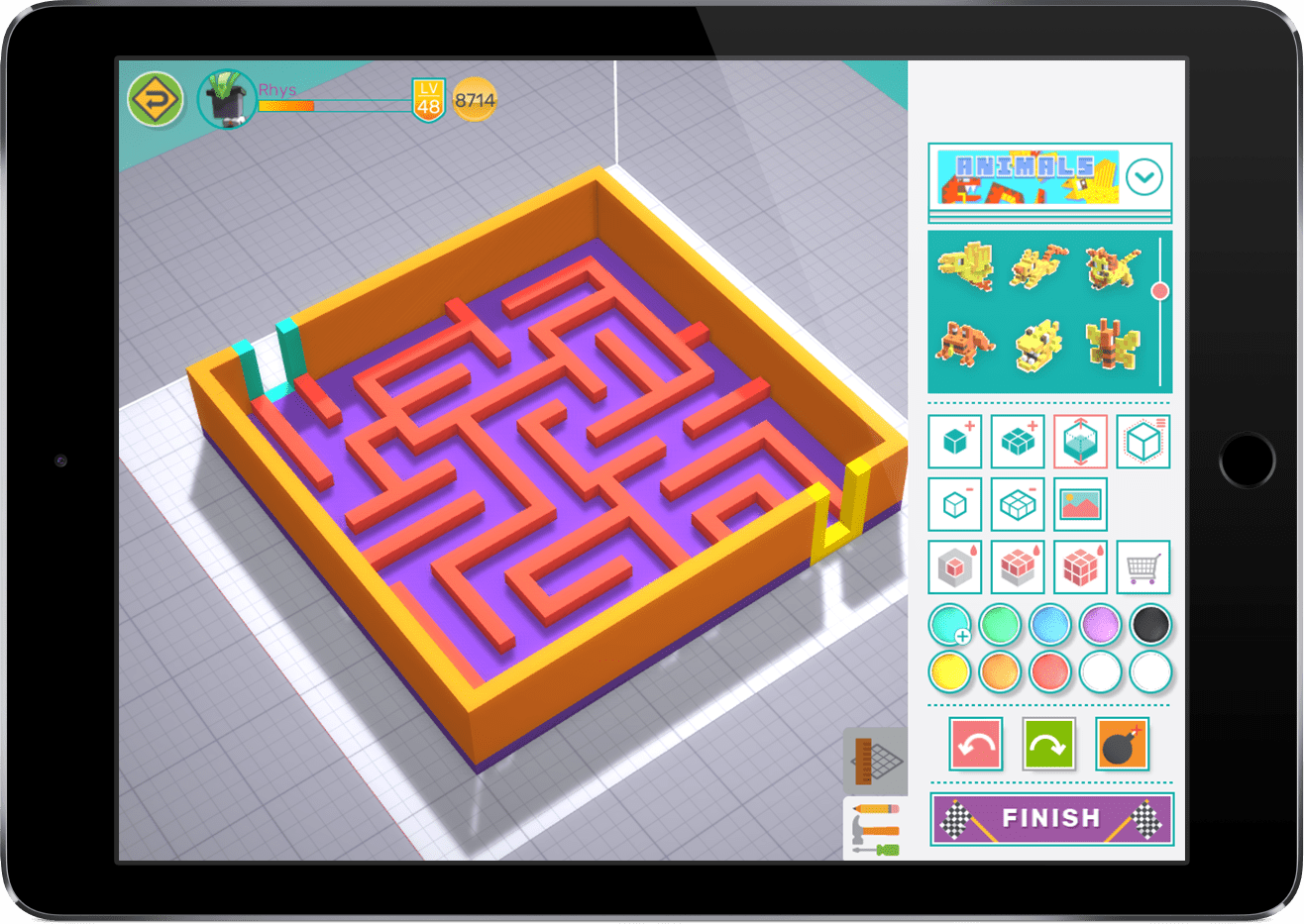
“Students learnt about spatial awareness, measurement, shape and sharing… They like the creativity they have with the range of different shapes and objects at their disposal. They also like the Game Zone section where they can share their mazes to others… Creating tasks that were relevant to the student’s interests enhanced student engagement. Students even went home and would play mazes. Students were very focused on the task as they had activities that were interest-based… Incorporating Makers Empire into a reading session helped students who lacked confidence reading… Students also improved their ability to work as a team and showed a sense of pride in their work… Our students love using it and I will continue to (use) Makers Empire in all aspects of our learning,”
Phillip Haig, Classroom Teacher
Jackson School for Special Needs Students, VIC
“When I first looked at this MakeShop project — metal jewellery — other projects were starting to eat into my curriculum time. So I couldn’t find time for it. That’s when I thought, how can we build this into something more while making it realistic for the students? How can I incorporate as many KLAs (Key Learning Areas) into it that I can?… This has been a really good learning opportunity for students – it had more opportunities than I even realised… Students that I had trouble engaging – they surprised me the most. Because it was non-traditional learning, they got up and jumped in… There was one student whose pendant’s design kept getting knocked back (as not being physically suitable for printing) and he was getting really frustrated. When he finally got it right, he said, ‘Mr Drain, thank you so much for pushing me – you have no idea how good I feel right now.'”
Luke Drain, Classroom Teacher
Carlingford West Public School, Sydney
“I’m loving the assessment option in Makers Empire, especially the bulk assessment – it is so easy and useful and I can personalize it and make it personal or private. What a great feature!…. Also, big thanks to you and the team for the missions. I’ve been using them with the Year 5 and 6 classes and they have really enjoyed them and have enjoyed the chance to be really creative, especially with the Secret Package module.”
Johanna Emptage, ICT Teacher
Courtenay Gardens Primary School, Victoria
“The benefit of Maker’s Empire is that it provides learning experiences using 3D Printing to enable students to develop their understandings of Design and Digital Technologies across all areas of the School Curriculum.”
Gary Romeo, Teacher
St Margaret's Primary School, Maribyrnong, Victoria
“A good way to get all students K-6 into understanding design, and the 3D platform in order to generate their design. Also the students like the idea of earning coin and purchasing elements for their hero. Students are very engaged. It promotes and consolidates mouse skills and mathematical concepts.”
Stein-Mavis Ward, Teacher
Narellan Public School, NSW
“[Makers Empire] is an easy and accessible way to get teachers to use their 3D printers and help students, even the littlest ones to design for the 3D printer.”
Siobhan Pawelczyk, Science Teacher
St Stephens School, Western Australia
“The ability to manage classes as a school. The fact that Makers Empire will print for you and provide support. They understand teachers. They have lesson plans and ‘how to’s’ included. An interface designed for students that is primarily student-friendly.”
Liam McComb, Teacher
Goodwood Primary School, South Australia
“A supportive curriculum-aligned platform to support the learning of design thinking and 3D printing.”
Emma Ryan, Teacher
St Joseph's Primary School, QLD
“I think the students’ engagement via the ‘training’ systems sets them up to be skilled to develop solutions in other learning situations. They also love seeing their designs take physical form, in spite of the challenges in printing. It seems like [Makers Empire] have a good grasp of getting students interested.”
Tony Fram, Teacher
St Patrick's Primary School Wangaratta, Victoria
“Makers Empire is an engaging, easy to use and student-friendly tool that promotes design thinking and creativity amongst my students.”
Megan Koop, Classroom Teacher
Blakeview Primary School, South Australia
“The biggest benefit of Makers Empire is the ability to set design tasks for the class and giving more children a chance to design and make.”
Kathryn Rowlison, Teacher
Carlingford Public School, NSW
“I like that the students manipulate 3-D shapes. This will help them with geometry as they get older. It is a skill that was built by playing with actual objects when I was younger. Many kids are not playing in the same way and we are noticing a deficit in these skills.”
Teacher
“WOW Mandi! I honestly can’t thank you enough for this. You continue to go above and beyond to help us and I appreciate it so much. I actually sent my Principal a message today letting him know this is probably my most favourite PD session I’ve been to. It is so well organised, resourced and structured. Thank you so much, Mandi!”
Lauren Smith, Year 4 Teacher
Our Lady of Mt Carmel Catholic Primary School, NSW
“I am using ME to create digital designs and lead into CAD for the upper grades… which means the students will be designing from scratch. Makers Empire establishes ways of working and terminology so the learning curve is not as steep.”
Roger Bartlett, Senior Teacher
Northern Peninsula Area State College, QLD
“This AR feature is wonderful. You guys never stop bringing new content in to keep kids engaged and keep the software fresh and I have to say I was hoping this feature would become available. It brings their models to life and AR is making its way into design and engineering in a big way so it is great for kids to use this tech in school. My students also realised new designs that could utilise the AR feature better like designing space ship cockpit that you could pretend to be in or even the interior of a house.”
Jay Wright, SET, STLAN and Technologies Teacher
Vale View State School, QLD
Thanks to the Makers Empire team for creating such a wonderful two days for the teachers from our school and others in the region. We are looking forward to steaming ahead with the Makers Empire project and what it might bring to our classrooms for all students.
Lyn Fletcher, Deputy Principal
Dalby South State School, Queensland
Hi Mandi, I just wanted to express my sincere thanks for all the lengths you and the Makers Empire teams went to, to run the pilot program and the PD sessions. I found the activities and sequence very engaging. Although I am now at a different school I found a lot I could incorporate into my current location. With all the setbacks we had in getting the PD sessions to happen I am so glad you persisted.
Emma Pukallas, Design, Technology and Engineering Teacher
Highfield State High School, Queensland
“I have a new role at the school this year and that is the STEAM specialist… I would love to have all the children using Makers Empire and printing in Semester 2 this year. Our Year 4 and 5 students loved the program last year and I am really excited to have all students using this space this year.”
Amanda Edwards, STEAM Specialist and Gifted & Talented Coordinator
Western Australia
“Just wanted to touch base and say thank you on behalf of Haden SS for the PD days. Skye has returned extremely satisfied with the experience and has commented on how useful the program will be in the future for her.”
Emily Dujela, Acting Principal
Haden State School, Queensland
“Makers Empire is a fantastic project that provides multiple benefits to students, teachers and schools. One of the most amazing things I saw was a non-verbal (by choice) student in year five, (being) involved in multiple, on-task conversations and actively involved in the problem-solving process. This student now says hello to me every day.”
Teacher
Queensland
“The most inspirational professional learning I have been part of.”
Darius Schwarz, Vice-Principal
Ashfield Primary School, WA
“The last two days have been fantastic. The program will be great for our school and was presented with care and excitement. Sharon and Luke helped me constantly with all questions and showed a genuine spirit for their work.”
Liam Kennedy, Teacher
Bullarto Primary School, VIC
“I have used other 3D design software with students but I can see Makers empire has some really good tools, such as students being able to view work done by other classmates and it checks models for potential printing problems.”
Ben Suter, Teacher
Golden Square Primary School, VIC
“This app has truly opened up a world of opportunities for the kids. They’re using it not only in technologies and science but also exploring literacy and art. Even if something doesn’t make it to the printer, I’m thrilled that they’re creating in 3D and sharing their designs as images. The parents have been amazed by their creativity! Thanks heaps.”
Kylie Lyon, Technology Specialist
Gwynne Park Primary School, WA
“I have found Luke to be an absolute asset. I’ve needed to contact him more than I’d care to admit and he’s always very prompt in his response. If he can’t help me sort an issue over the phone, he books me for onsite support, often fitting me in the very next day. I would strongly recommend Makers Empire for any school, particularly those wanting to dip their toe in the 3D printing waters.”
Jarad Tessari, Year 6 Teacher
West Lakes Shore School, SA
“I was a complete newbie with 3D printing, and have had a few issues with my printer – most as it turns out caused by me! The staff at Makers Empire have been exceptionally helpful, understanding and efficient. They have repaired my printer on a few occasions without any hassles or judgement. They have taught me how to troubleshoot, and following their videos I have become quite proficient at fixing minor problems with the extruder. Makers Empire staff fixed issues that I didn’t even realise that the printer had e.g. they replaced a broken clip on the cover – they printed and attached a new clip. Their service was friendly, efficient, economical and effective.”
Hajnalka Molloy, Teacher-Librarian
Aberfoyle Park Primary School, SA
“The Kids in Space competition run by Makers Empire was a tremendous success, enjoyed by both teachers and students alike. The challenge was well-received by the students, who relished the opportunity to work with 3D printers and were highly motivated to learn more. Their collaboration and social skills improved as they worked with new peers and took ownership of their projects. Teachers appreciated the chance to see their students thrive in different environments, observing their development of new skills and ideas. The competition also upskilled teachers, who are now transferring these new skills into their classrooms. The support and expertise provided by Makers Empire were invaluable, with their helpfulness ensuring the smooth running of the competition. The fun showcase event provided a great opportunity for both teachers and students to meet new people, share ideas, and reflect on their experiences. The emphasis on the design process over the end product made the competition accessible to all, ensuring that everyone could participate and benefit. Overall, the event fostered a positive and enriching experience for all involved.”
Peter Bannatyne, 5/6 teacher
Essington School Rapid Creek, NT
“I came in knowing nothing, left with ideas and knowledge overflowing! Not only learning about how to use Makers Empire to design and then print 3D models but also the whole thinking and making process is invaluable. Add our school priorities and this is an amazing program!”
Kylie Van Dangen, Teacher
Charthouse Primary School, WA
“These students have been learning about creating stories and developing characters. The students designed a character on their iPads, which were then printed using the latest 3D printing technology. Together with their buddies from Scotch, the students videoed their stories using their 3D characters and backdrops as settings. The narratives that took place between the students as they created their stories were very entertaining. It allowed the students to share ideas, develop vocabulary and use their imagination. Following on from this visit, the students will each work on writing their own stories.”
Heather Pope, Head of Junior School
Presbyterian Ladies College
“First, can I say how very much I, and my students, have loved using Makers Empire – it’s THE best program I have ever used! I loved your lesson plans, the continuous new ideas and innovations to the program but, most of all, your absolutely marvellous support. Every (silly) question or problem has always been sorted quickly and without me feeling embarrassed for having asked in the first place. I really, really am going to miss the excitement on the kids’ faces when their design works and gets printed for them to take home. So a huge THANK YOU to everyone!”
Johanna Emptage, STEM Teacher
Courtenay Gardens Primary School, Victoria
“I think I grew and learned as much (if not more) from the experience as the students. Our whole school community has engaged with the project and we’re excited to build on it going forward. The professional support from Makers Empire has been
outstanding and never felt intimidating which is quite a feat considering how many new skills, understandings, ways of working, and topics we were engaging with.”
Teacher participating in Kids in Space
Primary School, Victoria
“It was great to see students collaborating, socialising and working together to produce creative designs while also improving their critical thinking skills and spatial awareness. The project was really beneficial for the students’ holistic understanding of the design process, and learning how to break the process down into manageable steps to make the project more achievable. I was delighted to watch my students learn and develop their STEM skills over the two terms, and I was incredibly proud to see all of the students from Jackson School win a prize of a brand-new 3D printer.”
Sean Gales, Teacher
Jackson School, Melbourne
Thank you so much for your assistance and support, you and the team from Makers Empire have been wonderful throughout this whole experience for the students and we are all truly blessed to have had this opportunity to work with your organisation. Your communication, your drive and your commitment to seeing students exposed to new and wonderful ways of learning is outstanding and I look forward to an opportunity to work with you all again in the future.”
David Sukh, Primary School Teacher
Mount Evelyn Christian School
“Thanks again for this amazing project that we could be involved in. The kids learnt so much and thoroughly enjoyed the showcase on Tuesday. Thank you for all your hard work in organising it and for the treats we all received. We will definitely be doing so much more with makers empire. I have so many ideas from the other schools at the showcase so we are excited to implement these next year.”
LS Primary Classroom Teacher
Hillcrest Christian College, Queensland
“The best part of this project was the professional development. I have been to a lot in my time, but I have never experienced such a wide variety of teaching strategies and activities that engaged everyone. From our teacher heart to yours… thank you 😊 We also loved connecting with all the other schools around the Gold Coast and hope to reconnect in the new year.”
PJ, STEM Teacher
Hillcrest Christian College, Queensland
Thank you so much Leading the Additive Manufacturing Project in South-East Queensland in 2021… It has been a privilege to be part of the Project and the Staff and Students at Numinbah Valley State School have learned so much about design using 3D shapes and blocks, problem-solving, teamwork and resilience. Living in a small rural area, our students have limited knowledge of the technological advances in manufacturing in recent years. However, they are now both aware of new technologies, particularly 3D print technology, and inspired to engage with Design Technologies in High School and beyond. In 2022 I plan to continue to use Maker’s Empire software to engage the students in Years 1-3 and will encourage students who were in the project this year in Years 4 and 5, to act as mentors.”
Bev Bartlett, STEM Teacher
Numinbah Valley State School, Queensland
“Makers Empire is a wonderful initial tool in the 3D modelling learning process. It allows students to develop 3D design skills, make mistakes, and innovate in a safe environment. Individual creations include jewellery (earrings and rings), Taj Mahal, dream bed, funny characters, bookmarks, mazes, key chains, etc… Students are also using it before and after school, and many are now emailing 3D files created through Makers Empire from home.”
Jane Doherty, Teacher-Librarian
Kelvin Grove State College
“My Year 3/4 extension class are really enjoying the opportunities that Makers Empire provide. We are still finishing the Climate Change Project as students are presenting their knowledge in creative ways.. I have assigned the Managed Project – Finding Your Way and will introduce this next week. I have also created another class for some Year 2’s to begin Strong Structures as I did this last year and it was such a success. Students enjoyed the program and also had to create their own structures practically.”
Nicole Ebert, Teacher
Hillcrest Christian College
“In 2024, I was lucky enough to have our school selected into this fantastic (advanced manufacturing) program and I cannot recommend it more. Having never used a 3D printer before the start of this program, I can now say that I am extremely confident in my abilities. I felt support by #makersempire and found that the program was well run and the PD was both engaging and relevant.”
Grant K. Grierson, Head of E-Learning
Marymount College
“Highly recommend! Our college was a lucky recipient last year and then went on to win the showcase the training for the teachers and resources supplied are outstanding! Thank you Makers Empires for such an opportunity for our Engineering Excellence Students!”
Helen Hamilton, Secondary Teacher (Maths/Science)
Murrumba State Secondary School
“The 2 days of the Kids in Space have not only been informative but also incredibly practical and useful It has allowed me to understand the abilities of technology enhancing our STEAM program in an inclusive way. All the information (and the way its presented) was easy to understand (even for a novice.) This program would benefit so many students and schools.”
Claire Bradley, Teacher
Lauderdale Primary School
“Excellent! So refreshing to leave a PD session with skills I can actually use. Thank you.”
Owen Bowering, Teacher
Lauderdale Primary School
“A wonderful opportunity to further ourselves as educators. I feel much more prepared to deliver engaging and authentic STEM opportunities. Makers Empire is already a hit at our school.”
Alex Robinson, Teacher
Flinders Island District High School
“Such an enjoyable, engaging and interactive professional learning! Our kids are going to love this program and challenge and we can’t wait to embark on this journey!”
Rachel Fox, Teacher
Tridbunna District School
“Very well-structured program. Concise, helpful staff who gave us plenty of time to absorb material and learn. I love that it’s curriculum aligned. The make pedagogy is useful to apply to any STEM/STEAM project. I can’t wait to explore this with my students.”
Ana Prior, Teacher
Howrah Primary School
“6 White has been working hard on their “Kids in Space” projects over the last few weeks… They have decided that the best way to build a habitat on the moon is to use a team of Rovers who are able to utilize the raw materials already found on the moon and 3D print a habitat. To do this they have followed the process of Empathise (who needs our help), Define (what is the problem exactly), Ideate (how many ideas can we come up with to solve the problem?), and right now they are up to the prototype stage (then there is the test and Review stages to go). Prototyping involves the students working in teams with the Makers Empire software to design a 3D model of a moon rover with a specialized job in our newly established 3D design zone in the middle school STEM lab.”
Paula Kingsman, Principal
Kingsford Smith School, ACT
“This was the most interactive and knowledgeable PL. I was absolutely blown away by everything we were taught. Giving us time to explore Makers Empire was very beneficial.”
Sophie, Teacher
Monash Primary School
“Thanks for a well-oranised, inspiring program. There was a great mix of group work, pedagogy, Science professionals and self-exploration. I’m leaving feeling equipped and enthusiastic about how to structure design thinking opportunities for my students. What an imaginative, well resourced program.”
Kelly Reeves, Teacher
Kaleen Primary School
“Thank you so much for an insightful, informative and inspiring two days. Makers Empire offers an enormous scope for creativity, learning to learn, hard fun and an invaluable opportunity for students to broaden their understanding of Space and Earth.”
Mara, Teacher
Rosary Primary School
“I loved seeing the ‘out of the box thinking’ by our students & how they worked together to find solutions to their problems. This was the first time that our school had been involved in this project, so it was a wonderfully exciting and uncharted experience. In hosting the showcase – I loved seeing how beautifully our students represented Essington. I could not have been prouder of their engagement in the project, both throughout the term and at the showcase.”
Teacher
Essington School, NT
“The project was such a great experience for my students. They loved being able to create anything they wanted and the social aspect in Makers Empire is great. The showcase day was a great opportunity to see other school’s projects and designs and the confidence students showed when discussing their projects.”
Teacher
Primary School, Northern Territory
“The years 3 and 4 students investigated simple machines including levers, gears, wedges and pulleys. They used the Makers Empire 3D app to create these simple machines. The year 6 students explored a project called ‘Get in the Game’ as part of their inquiry into games. They used Makers Empire Design software to create their own game piece or characters. The third project involved students in designing and 3D printing items for a Makers Market. These designs included earrings, key rings and small figurines. Future plans are for the students to focus on problem solving around real-world applications. Teachers felt that the gaming elements of the software were very popular, and students enjoyed earning badges and sharing their designs. Students were encouraged to design, create, make mistakes and test ideas.”
Briony Watson, Teacher
Bees Creek Primary School, NT
“At Driver the students have been and considering ways that we can utilise satellite technology in order to better monitor, manage and respond to environmental issues such as bushfires, cyclones, and deforestation… I love teaching kids how to use a 3D printer and getting them to engage in the design process. 3D printing provides a tangible learning artefact that allows for a unique kind of representation and reflection on learning.”
Teacher
Driver Primary School
“The project was such a great experience for my students. They loved being able to create anything they wanted and the social aspect in Makers Empire is great. The showcase day was a great opportunity to see other school’s projects and designs and the confidence students showed when discussing their projects.”
Teacher participating in Learning by Design Project
Primary School, Northern Territory
“I have found Makers Empire to be highly engaging for all students. The gamification of learning has the students focused on the different achievements along the way and things they can purchase with their coins too. The interface is really straightforward to use for kids and adults alike. Makers Empire is well worth the consideration for any classroom.”
Jonno Brunton, STEM / Digital Technologies Teacher
Woodroffe Primary School
“I just wanted to let you know that Makers is up and running and the girls have come up with some wonderful ideas. I had them complete a design brief, first outlining something they’d like to design, create, manipulate etc. To help them do this I had them think of something that annoys them, they love, helps them, could potentially make life easier etc.”
Rebecca Burgmann, Junior School Teacher
Abbotsleigh School, NSW
‘I would like to send my heartfelt thanks and congratulations to you and the team involved in the Kids in Space showcase in Adelaide. I appreciate the enormous amount of time, organisation and co-ordination that was required to stage such a successful event. The opportunity to be involved provided a once in a lifetime opportunity for our students, and one I’m sure they will never forget. To be able to meet and interact with students from all states and territories, as well as the representatives from the space industry, was amazing and we learnt so much from them.”
Denise Minifie, Principal
Kent Road Public School
“The first day of PD created a sense of excitement amongst STEM teachers – we were buzzing with possibilities! The opportunity to work with Mandi from Makers Empire enabled the teachers to develop a greater understanding around the Design Thinking process and the endless potential of the Makers Empire program… After the PD day, the teachers had some great ideas. They then did some curriculum mapping to make sure it tied in with other subjects, and was a more holistic approach.”
Lisa Wahab, Principal
Mary Immaculate Primary School, NSW
“Excitement filled the air as the students excitedly walked around the room and listened to others passionately explain their projects. The students were in awe of each other and were clearly proud of themselves. The students started out being a little quiet, however, their confidence grew and they happily shared their work with others. It was evident that the students understood their projects well and they articulately explained their learning journeys, including their failures and how they learnt from them.”
Ashley Azzopardi, Kindergarten Teacher and Science & Technology Coordinator
Mary Immaculate Catholic Primary School
“(We’re) excited to be using the new 11 3D printers we have installed in a special hub at our school. I am now working with (fellow teacher) Luke Drain to roll out a plan for the school and ensure the process for every student (all 1700 of them!) to have access to 3D printing and ensure Design Thinking projects are embedded in teaching programs across K-6. I suggested to Luke we set up a Google Form for students to submit their thoughts and reflection of their designs based on the process before we press print so they are ensuring they are dedicating time to actually thinking through the process and not rushing to print… Once again, thank you and I will definitely stay in touch with you all! I couldn’t love Makers (Empire) more!”
Makers Empire 3D – world’s easiest to use 3D software
Start designing in 3D in minutes – no CAD experience necessary! Makers Empire 3D works on all devices and can be used by students as young as 4 years old.
“I have worked with several design software but Makers Empire is the easiest to use… One of the best things students learned is that it is okay to not get the “right” answer the first time, or second time. Students know that “failing” is part of the design process and problem solving,”
Casey Corn, STEM Teacher
Chesnee Elementary School, USA
Makes organising students and classes a breeze! Monitor your students’ progress, leave feedback on their designs and reward their good work.
“We loved the Teacher (Dashboard) with its support, ideas and integration of the Australian Curriculum. A great way to expose our students to this rapidly emerging technology that will have a significant impact on their lives”
Stephen Corcoran, Director of Digital Learning
St Stephen’s School, AUSTRALIA
[su_button url=”https://www.makersempire.com/teachers-resources-3d-printing-lesson-ideas-plans/” target=”blank” style=”ghost” background=”#00ada8″ color=”#00ada8″ size=”6″ wide=”yes” center=”yes” radius=”0″ text_shadow=”0px 0px 0px #ffffff”]Learn about the Teacher’s Dashboard[/su_button]
Be guided, supported and inspired by our expert learning team. Makers Empire’s innovative curriculum gives you an engaging and powerful means of teaching design and technology curriculum and offers exciting opportunities to develop your student’s design thinking skills. Makers Empire curriculum is aligned to the Common Core State Standards, ISTE Standards for Educators,Next Generation Science Standards and The Australian Curriculum.
“The software has lesson plans based on many state standards… (the students’) enthusiasm and absolute thirst for knowledge is awesome to see. They blaze through the challenging 3D lesson plans,”
Shneur Garb, Teacher
Ben Porat Yosef Yeshiva Day School, USA
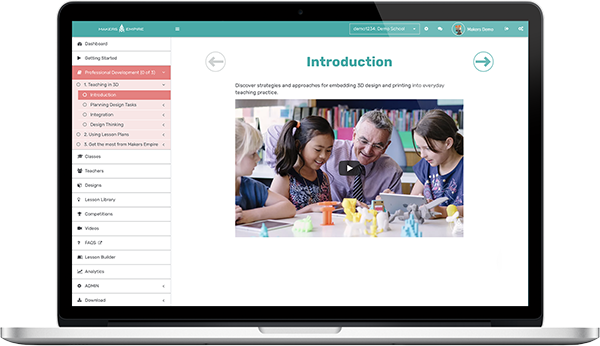
Gain a deeper understanding of the exciting field of Maker Pedagogy. Learn how to meaningfully integrate 3D design and printing in your classroom. Be inspired by the transformative power of Design Thinking. Our self-paced, on-demand, 13-part professional development series designed for teachers by teachers makes it easy!
“This was the best PD that I have been involved in for ages… This whole project has been inspiring for teachers and students in empowering students to become changemakers. Our students were so engaged and excited about solving a real-world problem… The fact that they could see they could help someone through their own design, meant their learning was authentic and valued,”
Bianca Laister, Deputy Principal
Birdwood Primary School, AUSTRALIA
[su_button url=”https://www.makersempire.com/professional-development/” target=”blank” style=”ghost” background=”#00ada8″ color=”#00ada8″ size=”6″ wide=”yes” center=”yes” radius=”0″ text_shadow=”0px 0px 0px #ffffff”]Learn more about professional development[/su_button][/su_column]
[/su_row]
You shouldn’t need to be a tech expert to be able to utilise 3D design and printing in your classroom. Our friendly support team provides ongoing and timely support whenever you need it so you can keep doing what you do best – teaching!
“Thanks… really appreciate your time. I’m now looking forward to getting the kids stuck into some serious design projects!”
Joe Grabin, 3rd Grade Teacher
North Melbourne Primary School, Victoria, AUSTRALIA
[su_note note_color=”#f27b7d” text_color=”#ffffff” radius=”0″]As a thank you for connecting with us at the ASLA Conference, receive 20% off the usual price when you purchase a Makers Empire’s School Subscription or Makers Empire 3D Printer Package. Use this special discount code — ASLA2019 — when requesting a quotation for Makers Empire to qualify. This offer won’t last so don’t delay – sign up today![/su_note]
130+ lesson plans aligned to the Australian Curriculum, American Common Core standards, ISTE standards for educators and Next Generation Science standards































 [/su_animate][su_spacer size=”20″][/device]
 [/su_animate]
 [/su_animate]
 [/su_animate]
 [/su_animate]